
With PDFs being so prevalent these days, I thought, "Who needs a fax machine anymore...?" and got rid of my fax machine a few years ago. Email suffices, and it just takes up space.
However, now that I've started working independently, there are occasional times when I need a fax machine to carry out my work.
"I'll send it as an email attachment later," or "I don't know how to open the file, so please send it by fax," and so on...
The data to be sent is almost always on a PC, so printing it out and going to a convenience store to send it by fax is far too troublesome and inefficient. Plus, it costs 50 yen per page, which is quite expensive.
Therefore, I'm making full use of the method that allows me to send faxes for free online.
It supports international use, both domestically and internationally, requires no registration, and is completely free. Literally, you can send faxes online anywhere in the world for free.
Today I'll introduce that service.
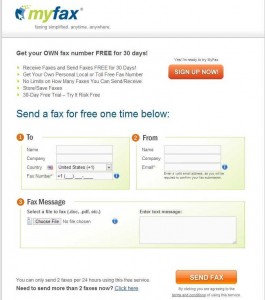
1. Access the above website and enter the required information ① to ③.
While you can generally fill in only the fields marked with an asterisk (*), it's recommended to fill in all fields as they will be included in the cover letter. For field ②, you can use a free email address, but it must be one that can receive emails. In field ③, select the attachments and enter a message for the recipient in the cover letter. The system supports all basic file formats, including Microsoft Word, Excel, PowerPoint, PDF, TIF, GIF, and JPEG. Note that for fields ① through ③, Japanese characters may appear garbled, so English (Romanized) input is required. The attached documents can, of course, be in any language.
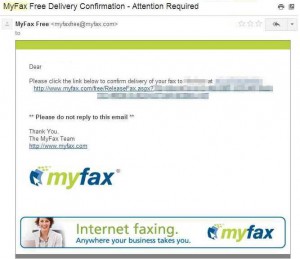
2. After a short while, you will receive an email at the email address you entered in step ② with the subject line ”MyFax Free Delivery Confirmation – Attention Required,” as shown above.
This is a confirmation email, so please click on this URL link (http://www.myfax.com/free/ReleaseFax.aspx/...).
After this, a fax call will be made to the recipient in 1 to 3 minutes. If it is not received, it will redial three times and retry sending.
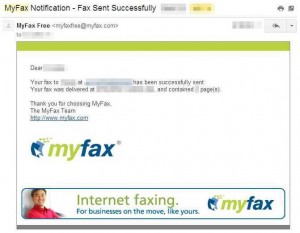
3. Once the fax transmission is successfully completed, you will receive another email confirming successful transmission, such as the one above titled ”MyFax Notification – Fax Sent Successfully”.
It's free, so you can use it without hesitation, and it's very convenient.
The limitations are that it can be used up to twice within a 24-hour period, and each transmission is limited to a maximum of 10MB (about 10 pages of PDF). For my fax usage frequency, this is sufficient for now.