

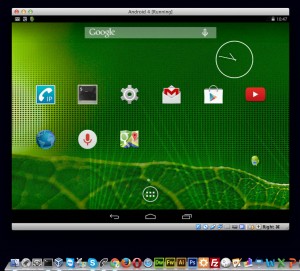
 Although I still don't own a tablet device, I created a virtual environment for Android 4.4.2 using Oracle's VirtualBox to test a tablet for website development. I won't go into detail about how to install Android OS on VirtualBox here, as it's explained in many places, but running a virtual Android tablet on my PC for environment testing was more than sufficient. And while I was at it, I also tried out a SIP phone app...CSipSimpleI installed the software to test whether an Android tablet could be used as a phone even in a virtual environment. My PC is a MacBook Pro.
https://www.youtube.com/watch?v=D2ZaJlkKZzw
It seems to work perfectly fine. Both internal and external calls can be made and received normally. It also appears to be usable for SIP environment testing. However, when using this virtual Android tablet with a Mac, a few minor setting changes may make it easier to use, which I will describe below.
- If I leave the virtual Android instance idle for a while, the screen goes completely black and won't return to normal.
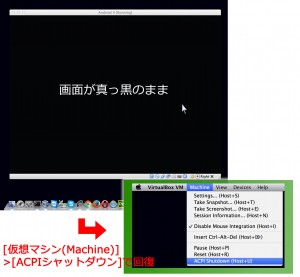
From the VirtualBox menu, Virtual Machine > ACPI Shutdown (Host+U) Selecting this option will restore the screen.
- The operation of the "Host (left command) key" assigned to the shortcut is not working properly.
 In VirtualBox, the Host key is assigned by default to the left Command key on a Mac. However, since the left Command key is used frequently, it's easy to accidentally press it and cause malfunctions. Therefore, we will assign the Host key to a different key. Here, we will show an example of changing it to the right Command key.
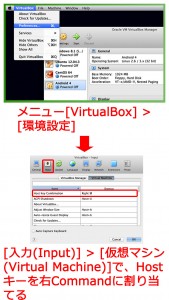
From the VirtualBox menu,
VirtualBox > Environment Settings Select this option. Input > Virtual Machine
Next, change the Host key combination from Left Command to Right Command. (At this point, do not immediately press the [OK] button. Click somewhere else first, then press the [OK] button.)
Also,
Automatic keyboard capture
Also, uncheck that checkbox.
With this, the aboveACPI shutdown (Host+U) This can also be done by pressing Right Command + U.Mouse integration (Host+I)This also becomes Command + I on the right, which significantly reduces accidental activation.