

One common problem I receive from various people is, "Chrome has been really slow lately..." Some even say, "I tried clearing all the cache in the settings, but it still didn't improve," after having already tried various solutions. This refers to clearing the Chrome cache, which can be done by going to the top right of the browser. Settings (three lines) → Tools → Clear browsing history → Check "Cache" in the pop-up → Clear browsing history data They tried this, but the result was no improvement. 
Google Chrome has gained popularity because it is a simple and fast browser, but it has quite a few quirks that set it apart from other browsers.
The same applies to clearing the cache as described above; the procedure outlined doesn't actually completely clear the cache. I, too, am sometimes confused by Chrome's cache. So, I'll introduce a method I use: how to completely clear Chrome's cache.
The folder locations differ between Windows and Mac, so I will list them separately.
■ Completely clearing Chrome cache – for Windows
C:\Users\(username)\Local\Google\Chrome\User Data\Default\Cache
Delete all contents.
<Instructions>
To access these files, you need to show hidden folders and file extensions. First, launch File Explorer, click "View" in the menu bar, and display the toolbar. 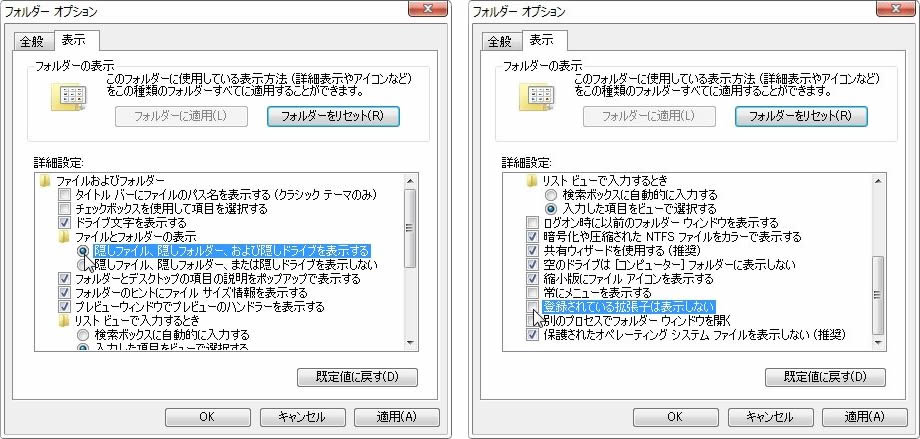 Check the two locations mentioned above.
 Access C:\Users\(username)\Local\Google\Chrome\User Data\Default\Cache and move all contents of the Cache folder to the Trash.
■ Completely clearing Chrome cache – for Mac
(Username) Library Caches in Google Chrome
- Contents of PnaclTranslationCache
- Contents of Default Cache
- Contents of Default MediaCache
Delete all of them.
<Instructions>
The Library folder is a hidden folder, so it is not normally displayed.
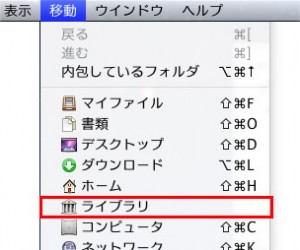
Access Finder and click "Go" in the menu bar. Then, press the OPTION key to bring up "Library".
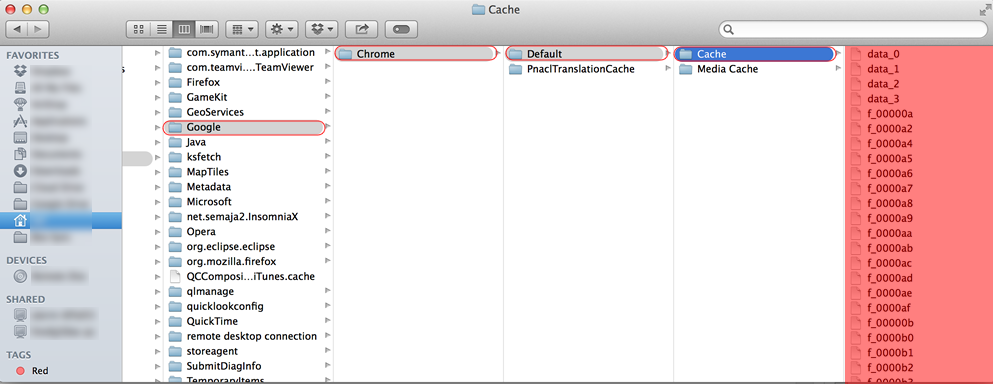 Next, access Caches > Google Chrome Default Cache and move all the contents of the Cache folder to the trash.
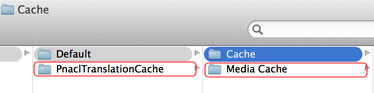
Furthermore, move all the contents of the MediaCache folder and all the contents of PnaclTranslationCache to the trash.
This completes the process of completely clearing Chrome's cache. Please note that this involves modifying the system area, so proceed at your own risk.
関連記事 : Google Chromeで画像系の表示がおかしい? ー ハードウェア アクセラレーションの設定を疑え!